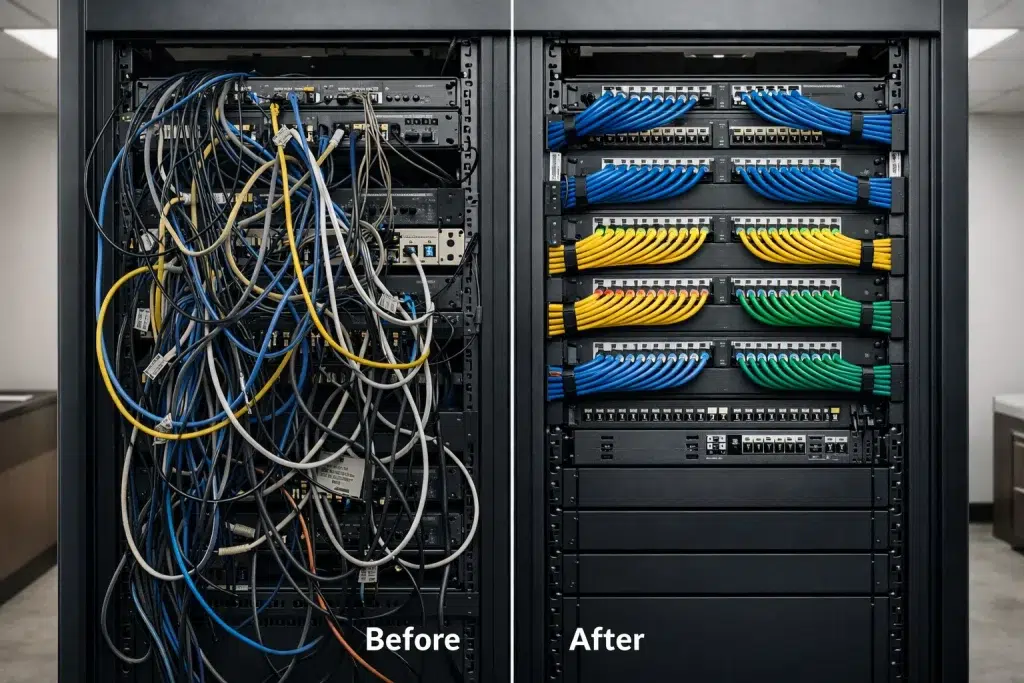
Common Mistakes in Cabling Installations (Video): What IT Techs See in the Field
Most network issues are not “mystery problems.” They often start as Cabling Mistakes during the install. These Installation Errors can quietly weaken your IT Setups, even when everything looks fine on day one. Therefore, this guide breaks down the most common mistakes we see on real jobs, how they show up later, and what to do instead.
This post is written to support a short video. You can embed the video near the top. Then you can reuse each section as a social post or a short clip. In addition, the checklist at the end helps you review installs before sign-off.
Where Cabling Installs Go Wrong (And Why It’s So Common)
Cabling is sometimes treated like “just pulling wire.” However, structured cabling is a system. It needs planning, clean workmanship, and testing. Otherwise, you get a network that works at first, but fails under load later.
Also, many issues hide behind walls and ceilings. So, if you do not test and document the work, you cannot prove what is good and what is not.
A quick standards note (TIA/EIA)
When we say “industry standards,” we mean common structured cabling practices based on TIA/EIA guidelines. In simple terms, these standards cover how cables should be installed, terminated, labeled, and tested. Therefore, following them reduces risk and makes troubleshooting faster.
Recommended Video Placement + Chapters
Place your video right below the intro paragraph. Then add chapter timestamps in the video description that match the sections below. Consequently, readers can scan the article and jump to the exact mistake they want to fix.
- 00:00–00:20 Why cabling mistakes cause long-term downtime
- 00:21–01:15 Termination errors (jacks and patch panels)
- 01:16–02:05 No labeling and no port map
- 02:06–03:05 Wrong cable type for PoE and environment
- 03:06–04:05 Pathway damage (bends, tension, crushed bundles)
- 04:06–05:05 Skipping testing and certification reports
- 05:06–06:00 Closet mistakes (airflow, patching, strain relief)
- 06:01–06:30 Final checklist and next steps
Mistake #1: Poor Terminations (The “It Works… Until It Doesn’t” Problem)
Terminations are the cable ends at the keystone jack and patch panel. This is where many installation errors happen. For example, techs often see pairs untwisted too far, conductors not fully seated, or mixed wiring patterns. As a result, the cable may link up, but performance is unstable.
Real-world scenario
A retail office reports “random POS lag.” The switch shows the port flapping. The cable passes a basic continuity test, but fails under load. After re-terminating both ends with proper pair control, the issue disappears.
What you may notice
- Speed drops (1G negotiates to 100M)
- Packet loss during video calls
- PoE devices reboot or act unstable
- Problems that come and go
Corrective steps (standards-based)
- Pick one wiring scheme (T568B is common) and use it everywhere
- Keep pair twists as close to the termination as possible
- Use quality jacks, patch panels, and proper punch-down tools
- Re-test after re-termination, not “later”
Mistake #2: No Labels, No Port Map, No As-Builts
This is one of the most expensive cabling mistakes over time. Without labels, every change takes longer. Then every outage takes longer too. Therefore, labeling is part of a professional structured cabling install.
Real-world scenario
A business adds three new workstations. The contractor spends hours toning cables because nothing is labeled. The client pays for time that should not exist. After a proper port map is created, future changes take minutes.
Corrective steps
- Label both ends of every run (panel and outlet)
- Deliver a port map that matches the labels
- Provide closet photos after cleanup
- Provide “as-built” notes for any changes from the plan
Mistake #3: Using the Wrong Cable Type (PoE, Plenum, Outdoor)
Not all cable is the same. Some installs use low-quality materials, mixed parts, or the wrong jacket rating. It may work at first. However, heat, moisture, and PoE load can expose weak points fast.
Real-world scenario
An outdoor camera works for months. Then it starts dropping after rain and sun exposure. The cable jacket was not rated for outdoor use. After replacing it with proper outdoor-rated cable and sealing entry points, the drops stop.
Corrective steps
- Match cable to the space (standard, plenum, riser, outdoor)
- Plan PoE needs early (cameras, access points, phones)
- Standardize materials across sites for easier support
- Do not mix random jacks and patch panels without a plan
Mistake #4: Damaging Cable in the Pathway (Bends, Tension, Crushing)
Cable is not a rope. If you bend it too tightly or pull it too hard, you can damage it inside the jacket. Then the cable becomes a future failure point. Also, tight bundles can trap heat, which matters for PoE.
What techs see during audits
- Kinks and sharp turns above ceilings
- Bundles crushed with tight zip ties
- No service loops for future work
- Runs too close to electrical lines and noise sources
Corrective steps
- Maintain proper bend radius and avoid kinks
- Use Velcro instead of over-tight zip ties
- Use cable supports and clean pathways
- Keep separation from electrical where possible
Mistake #5: Skipping Testing (Or Only Testing “A Few” Runs)
A link light is not a test. If you do not test, you are guessing. Therefore, require testing results for every run. This is even more important for PoE devices, video traffic, and high-density WiFi.
Real-world scenario
A medical office adds new access points. Two of them reboot under load. The cables “look fine.” Testing shows marginal performance on those runs. After re-terminating and re-testing, stability returns.
Corrective steps
- Require a report for each cable ID (pass/fail)
- Re-test after any fix and include the updated report
- Store reports with your IT documentation
Mistake #6: A Messy Network Closet (Heat, Airflow, and Support Pain)
The closet is the heart of your IT setups. If it is messy, every future change becomes harder. Also, heat becomes a real risk. Therefore, closet standards matter as much as the cable itself.
Corrective steps
- Use patch panels and proper cable management
- Add strain relief so cables are not pulling on terminations
- Keep power and data organized
- Plan airflow for switches, NVRs, and gateways
Copy/Paste Checklist: Catch Cabling Mistakes Before You Sign Off
- All runs labeled on both ends
- Port map delivered and matches labels
- Consistent wiring scheme used across the site
- Patch panels and jacks terminated cleanly
- No kinks, tight bends, or crushed bundles
- Correct cable type used (plenum/riser/outdoor as needed)
- PoE devices stable under load (no reboots)
- Testing reports provided for every run
- Closet is clean, organized, and has airflow
- As-built notes delivered for changes from the plan
Conclusion: Prevent Installation Errors Before They Become Downtime
Cabling mistakes are expensive because they hide. However, most installation errors are preventable with standards-based work, labeling, and testing. Therefore, use the checklist above before you approve the job. If you want a second opinion, a structured cabling review and network assessment can catch issues early and protect your IT setups.
Schedule Your Free Cabling Install Review
Contact UniFi Nerds for a standards-based assessment to find cabling mistakes, correct installation errors, and stabilize your IT setups
Call: 833-469-6373 or 516-606-3774 | Text: 516-606-3774 or 772-200-2600
Email: hello@unifinerds.com | Visit: unifinerds.com
Free consultations • Phased implementation • Budget-friendly • Testing + documentation